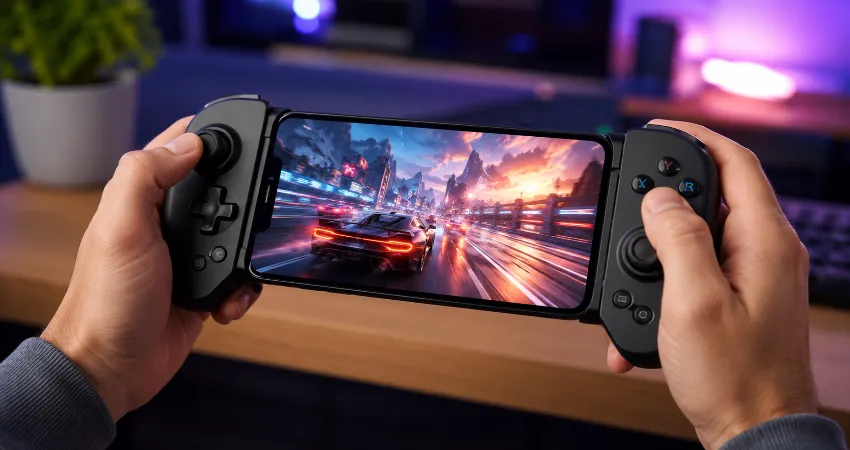
For years, I believed touchscreen gaming was simply the natural future of mobile gaming. Smartphones became more powerful every year, displays became smoother, and developers created impressive games that looked almost like console titles. However, there was always one problem I could never fully ignore: controlling complex games with fingers covering the screen never felt completely comfortable.
My experience changed when I started using dedicated mobile controllers. Instead of struggling with virtual buttons, delayed touch responses, and limited control layouts, I discovered a much more familiar gaming experience. Physical controls brought precision, comfort, and a level of consistency that touchscreen controls often cannot provide.
After testing different types of mobile gaming controllers, I realized they were not just accessories for serious gamers. They can improve the experience for anyone who enjoys action games, racing titles, platformers, cloud gaming, or long gaming sessions on a smartphone. This article explains how mobile controllers changed my approach to smartphone gaming and what users should consider before choosing one.
Why Touchscreen Controls Started Feeling Limiting?
Touchscreen controls are convenient because every smartphone already has a built-in interface. There is no extra hardware to carry, and casual games work perfectly well with simple taps and swipes. However, when games require quick reactions, multiple buttons, or precise movement, the limitations become noticeable.
One of the biggest issues is the lack of physical feedback. A touchscreen button does not actually move or respond like a real controller button. Your fingers have to constantly look for their position, and accidental touches can interrupt gameplay. During longer sessions, holding a phone in a gaming position can also create hand fatigue.
The Moment A Mobile Controller Changed My Experience
The first time I used a mobile controller, the difference was immediately clear. Games that previously felt difficult became much easier to manage because my fingers were no longer blocking important areas of the display. Movement, camera control, and action commands felt more natural.
The biggest improvement was consistency. With touchscreen controls, every session depends on finger placement and screen sensitivity. A physical controller provides the same button layout every time, allowing your hands to develop familiarity through regular use.
How Mobile Controllers Improve Smartphone Gaming?
A good mobile controller improves several parts of the gaming experience. The most obvious advantage is better control accuracy. Physical analog sticks allow smoother movement, while real buttons make quick actions easier to perform.
Comfort is another major benefit. Instead of gripping a thin smartphone and reaching across the display, many controllers transform the phone into a handheld gaming device. This design reduces strain during extended play sessions.
Mobile controllers also make smartphones more versatile gaming platforms. They work especially well with games that support controller input, including racing games, adventure titles, fighting games, and many cloud gaming services.
Different Types Of Mobile Gaming Controllers
Mobile controllers are available in several designs, and each type serves a different purpose. Clip-style controllers attach to a smartphone and create a handheld console-like experience. They are popular because they are portable and easy to store.
Some controllers connect wirelessly through Bluetooth, while others use a direct connection through a smartphone port. Wired options usually provide lower input delay, while wireless models offer more convenience and flexibility.
There are also compact controllers designed for travel and larger models built for users who prefer a traditional console controller shape. The best choice depends on gaming habits, device compatibility, and personal comfort preferences.
What I Learned After Switching To Physical Controls?
My biggest lesson was that better hardware does not automatically make games better, but it removes unnecessary limitations. A controller does not improve the graphics or story of a game. Instead, it allows the player to interact with the game more naturally.
I also noticed that I played more comfortably for longer periods. The reduced hand movement and improved grip made gaming feel less tiring. This was especially noticeable with games that require continuous movement or frequent button combinations.
Important Features To Consider Before Buying A Mobile Controller
Compatibility should be the first consideration. A controller should support your smartphone model, operating system, and the games you want to play. Some controllers work with a wide range of devices, while others are designed for specific platforms.
Build quality is equally important. Buttons should feel responsive, the grip should be comfortable, and the controller should hold the smartphone securely. A poorly designed controller can create more frustration than improvement.
Battery life matters for wireless controllers. Frequent charging can become inconvenient, especially for users who travel or play away from home. Checking connection stability and supported features can help avoid disappointment.
Are Mobile Controllers Worth It For Casual Players?
Not every smartphone user needs a controller. If someone mainly plays puzzle games, simple arcade titles, or games designed around touch controls, a controller may not provide a major benefit.
However, users who regularly play advanced mobile games can notice a significant improvement. A controller becomes more valuable when games require precision, quick reactions, or long sessions where comfort matters.
FAQs About Mobile Controllers
1. Do mobile controllers work with all smartphone games?
No, mobile controllers do not automatically work with every smartphone game. The game itself needs to support controller input, or the controller may require additional software mapping features. Before purchasing, it is important to check whether your favorite games are compatible.
2. Are mobile controllers better than touchscreen controls?
Mobile controllers are not always better because touchscreen controls are still useful for many casual games. However, for games requiring accurate movement, fast actions, or complex controls, a physical controller usually provides a more comfortable and reliable experience.
3. Can a mobile controller improve gaming performance?
A controller can improve performance by making controls easier and more consistent, but it does not directly increase processing power or graphics quality. The improvement comes from better interaction between the player and the game.
4. Are Bluetooth mobile controllers reliable?
Modern Bluetooth controllers are generally reliable when paired with compatible devices. Quality models offer stable connections, but users should consider battery life, connection speed, and manufacturer support before choosing one.
5. Can mobile controllers be used for cloud gaming?
Yes, many mobile controllers are designed with cloud gaming in mind. They can make smartphone cloud gaming feel closer to playing on a traditional console because users get physical buttons and analog controls.
6. Are mobile controllers comfortable for long gaming sessions?
A well-designed controller can make long gaming sessions more comfortable by improving grip and reducing finger movement on the touchscreen. Comfort depends on the controller shape, weight, and how well it matches the user’s hands.
7. Should I choose a wired or wireless mobile controller?
Wired controllers usually provide a direct connection, while wireless controllers offer greater freedom of movement. The better option depends on whether you prioritize simplicity, portability, or connection stability.
8. Do mobile controllers work with tablets?
Many mobile controllers can work with tablets if the device supports the required connection method. However, larger devices may need controllers with adjustable grips or broader compatibility.
9. How do I maintain a mobile controller?
Keeping a controller clean, storing it safely, avoiding moisture, and charging it properly can help extend its lifespan. Regular maintenance also keeps buttons and connection points working smoothly.
10. Is buying a mobile controller a good investment?
For frequent mobile gamers, a quality controller can be a worthwhile investment because it improves comfort and control. For occasional players, it may not be necessary unless they want a more console-like gaming experience.
Conclusion
Mobile controllers changed the way I view smartphone gaming. They do not replace the convenience of touchscreen controls, but they solve many of the problems that appear when playing more demanding games.
Better precision, improved comfort, and a more natural control experience make mobile controllers a valuable upgrade for many gamers. After switching from touchscreen-only gaming, going back feels much less enjoyable.