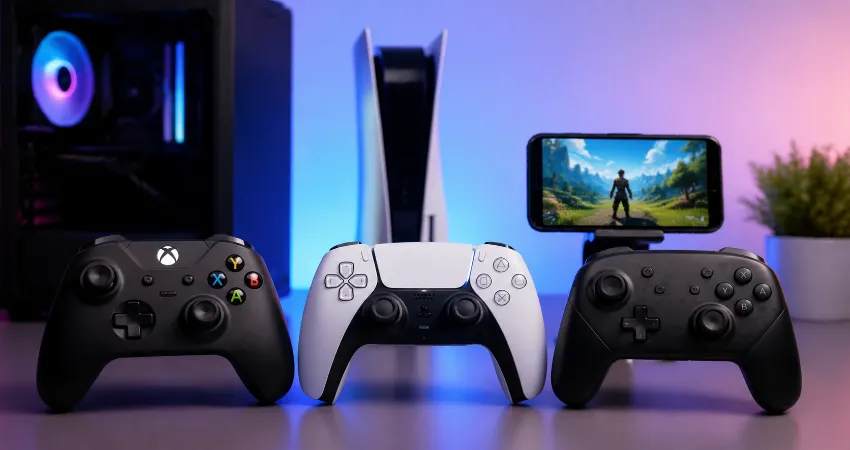
Gaming has become more flexible than ever. Many players no longer use only one device for entertainment. A single person may play competitive games on a PC, enjoy console titles in the living room, and continue gaming on a smartphone while traveling. Because of this changing habit, having a controller that works across multiple platforms has become a practical choice rather than a luxury.
Modern universal gaming controllers are designed to reduce compatibility problems and remove complicated installation steps. The best models can connect with a computer, gaming console, and mobile phone using familiar wireless standards such as Bluetooth or dedicated wireless connections. A reliable multi-platform controller can make gaming more comfortable while allowing players to switch devices quickly.
This guide explores the controllers that work on PC, console, and phone without extra setup, explains what makes them compatible, and highlights the important features users should consider before choosing one. The focus is on real-world usability, easy connection, comfort, and long-term value.
What Makes A Controller Work Across PC, Console, And Phone?
A multi-platform controller needs strong compatibility support to communicate with different operating systems and gaming devices. PCs usually support controllers through USB connections, Bluetooth, or wireless adapters. Smartphones commonly rely on Bluetooth, while consoles often require specific compatibility systems created by manufacturers.
The most convenient controllers use widely supported input standards. Features like Bluetooth connectivity, USB-C charging, automatic device recognition, and built-in compatibility profiles help players connect without searching for additional drivers or complicated software. A good controller should feel almost plug-and-play regardless of the device being used.
Why Plug And Play Controllers Are Becoming More Popular?
Many gamers prefer simple hardware that works immediately after connection. Traditional controllers sometimes required manual configuration, button mapping, or third-party applications. While advanced customization still has value for some users, most players want a smooth experience where they can connect a controller and start playing within seconds.
From a practical testing perspective, the biggest advantage of modern multi-device controllers is convenience. Switching from a PC game to a mobile game should not require rebuilding settings every time. Controllers with strong compatibility profiles make this transition much easier.
Important Features To Look For In A Multi Platform Controller
Choosing the right controller depends on more than just device support. A controller may technically work on several platforms but still provide a poor experience if the buttons, battery life, or connection quality are weak.
- Wireless connectivity: Bluetooth support is essential for phones and useful for PCs. A stable wireless connection reduces cable clutter and gives players more freedom.
- Comfortable design: A controller should feel natural during long gaming sessions. Ergonomic grips, responsive buttons, and well-positioned analog sticks improve overall comfort.
- Battery performance: A good rechargeable battery prevents interruptions. Longer battery life is especially important for players who frequently switch between devices.
- Wide game support: The controller should work with popular gaming platforms and applications without requiring complicated adjustments.
Controllers That Offer Broad Device Compatibility
Several categories of controllers are known for working well across different platforms. Official controllers from major gaming brands often provide excellent reliability because they are designed around specific ecosystems while still supporting other devices.
Third-party universal controllers can also provide strong value. Many of these models focus on Bluetooth compatibility and support multiple operating systems, making them useful for players who own different types of devices.
The best option depends on the user’s gaming habits. Someone who mainly plays on PC and occasionally uses a phone may prefer a Bluetooth controller with wide computer support. A console-focused gamer may choose a controller that offers official console compatibility while still connecting to other devices.
How Easy Setup Improves The Gaming Experience?
A controller that connects instantly removes unnecessary frustration. Players should spend their time enjoying games rather than troubleshooting connection errors or searching for configuration guides.
Easy setup also benefits families and casual gamers. When multiple people use different devices in the same home, a simple controller that works everywhere becomes more practical. Users do not need separate accessories for every screen.
PC Gaming Benefits From Universal Controllers
PC gaming offers thousands of titles, but keyboard and mouse controls are not always ideal for every genre. Racing games, platform games, sports titles, and many action games often feel better with a traditional controller layout.
A universal controller allows PC players to enjoy console-style comfort while keeping the flexibility of computer gaming. Many modern controllers are automatically recognized by popular PC gaming platforms, making the setup process much easier.
Mobile Gaming With A Physical Controller
Smartphone gaming has grown beyond simple touch-based games. Many mobile titles now support external controllers, giving players more accurate movement and better control.
A Bluetooth controller can transform a phone into a portable gaming system. It is especially useful when playing games that require precise timing, complex controls, or longer sessions where touchscreen controls become uncomfortable.
Console Compatibility And What Users Should Know
Console compatibility can be more complicated because manufacturers often use their own authentication systems. A controller that works perfectly on a PC and phone may not automatically work on every console.
Before purchasing, users should always confirm official compatibility information. The easiest setup usually comes from controllers designed specifically for a console family while also supporting additional devices.
Common Mistakes When Choosing A Universal Controller
One common mistake is focusing only on the number of supported devices. A controller may advertise broad compatibility but provide poor performance, uncomfortable design, or weak battery life.
Another mistake is ignoring connection methods. Some controllers require specific adapters, while others work directly through Bluetooth. Understanding these differences helps buyers choose a product that matches their actual needs.
Frequently Asked Questions
1. Can one controller really work on PC, console, and phone?
Yes, some controllers are designed to support multiple platforms, but compatibility depends on the specific model. PC and phone support are usually easier because they commonly use USB or Bluetooth connections. Console support may require official certification or additional compatibility features.
2. Do universal controllers need drivers or extra software?
Many modern controllers work without additional drivers because operating systems can automatically recognize them. However, some advanced controllers may include optional software for customization, button changes, or firmware updates.
3. Is Bluetooth better than a wired controller?
Bluetooth provides convenience because it removes cables and works well with phones and many computers. Wired controllers can still be useful because they offer a direct connection and do not require battery charging. The better option depends on personal preference and gaming style.
4. Will a PC controller automatically work with every game?
Most modern PC games support common controller layouts, but not every game has native controller support. Some older or specialized games may require manual configuration before the controller functions properly.
5. Can I connect a wireless controller to my smartphone?
Many wireless controllers can connect to smartphones through Bluetooth. Users should check whether their phone operating system and the specific controller model support external game controllers before buying.
6. Are expensive controllers always better?
Higher-priced controllers often include better materials, improved durability, and extra features, but price alone does not guarantee the best experience. The right controller should match the user’s preferred devices and gaming habits.
7. How important is battery life in a wireless controller?
Battery life is very important for wireless gaming because frequent charging can become inconvenient. A controller with longer battery performance provides a smoother experience, especially for people who play for several hours at a time.
8. Can I use a console controller on a computer?
Many console controllers can connect to computers through cable, Bluetooth, or wireless adapters. Compatibility varies by model, so users should confirm support before connecting.
9. What is the easiest controller setup for beginners?
Beginners should look for controllers with simple Bluetooth pairing, automatic device recognition, comfortable design, and clear compatibility information. A straightforward setup process makes the gaming experience much more enjoyable.
10. What should I check before buying a multi-platform controller?
Before purchasing, check supported devices, connection methods, battery life, comfort, button quality, and customer feedback. Choosing based on actual usage needs is more important than selecting a controller with the longest feature list.
Conclusion
Controllers that work across PC, console, and phone without extra setup provide a more flexible and comfortable gaming experience. The best choices combine reliable connectivity, wide compatibility, strong build quality, and easy operation.
By understanding platform support and focusing on practical features, players can choose a controller that fits their complete gaming lifestyle.